

Query with SQL
Run Spark SQL on your Nexus tables in the SQL editor or from code, check what a query reads first, and pass values safely as parameters.
The SQL editor runs queries on the , which speaks SQL. Every example here uses a small sample table you create first, so you can follow along in an empty workspace.
Before you start
- Anyone can read the tables they have access to.
- Creating a table needs the right to change structure; adding rows needs the right to change data. Owners and admins have both. See Data access.
- How much one query may read and how many rows come back depend on your plan. See your own limits in SettingsUsage & limits, or with
nx.limits()in code.
Run a query
Open the SQL editor
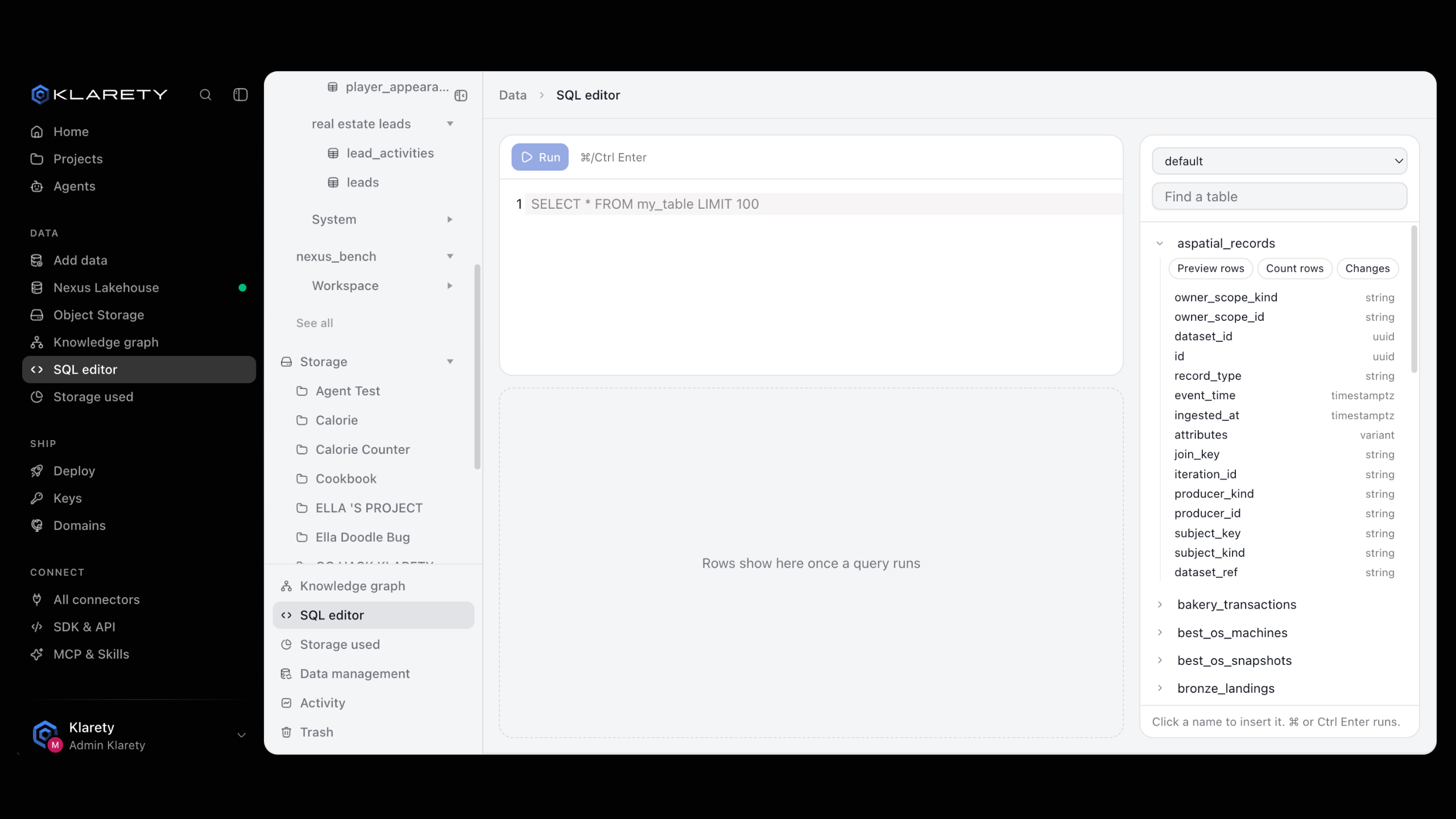
Go to DataSQL editor. The panel beside the editor lists your Tables by Schema.
Write one statement
Type a statement, or click a table or column name to insert it. The panel also offers Preview rows, Count rows and Changes.
Run it
Select Run, or press ⌘ Enter (Ctrl Enter on Windows and Linux).
Read the result
Rows show under the editor, with how much the query read (Reads, then a size). Select Next page for the rest of a long result.
Before every run, the editor checks what the query would read. If that is more than your plan allows, nothing runs and you see Would read, the size, and how much is allowed. Narrow the query and run it again.
from klarety import Nexus

with Nexus.connect() as nx:
    result = nx.sql("SELECT current_date() AS today")
    print(result.rows)
    print(result.bytes_scanned)
nx.sql() waits while the statement runs; a resend after a dropped connection never runs it twice. From the command line: klarety sql "SELECT current_date()".
Create a sample table
One statement per run
The editor and the API run one statement at a time. Run each block below on its own.
A name without a , such as demo_orders, goes in the default schema.
CREATE TABLE demo_orders (
  order_id BIGINT NOT NULL,
  customer STRING,
  country STRING,
  status STRING,
  amount DECIMAL(10, 2),
  ordered_at TIMESTAMP
)INSERT INTO demo_orders VALUES
(1, 'Ana', 'CO', 'paid', 120.50, TIMESTAMP '2026-10-01 09:15:00'),
(2, 'Bruno', 'BR', 'paid', 80.00, TIMESTAMP '2026-10-02 14:40:00'),
(3, 'Carla', 'CO', 'refunded', 45.25, TIMESTAMP '2026-10-03 11:05:00'),
(4, 'Diego', 'MX', 'paid', 210.00, TIMESTAMP '2026-10-03 16:30:00'),
(5, 'Ana', 'CO', 'paid', 60.00, TIMESTAMP '2026-10-05 08:00:00'),
(6, 'Elena', 'MX', 'paid', 99.90, TIMESTAMP '2026-10-06 19:20:00')Nexus tables are tables, so a plain CREATE TABLE is enough. Leave out USING, or write USING iceberg.
Example queries
Revenue and order count per country:
SELECT country,
       COUNT(*)    AS orders,
       SUM(amount) AS revenue
FROM demo_orders
WHERE status = 'paid'
GROUP BY country
ORDER BY revenue DESC
Each customer's running total, with a window function:
SELECT customer,
       ordered_at,
       amount,
       SUM(amount) OVER (PARTITION BY customer ORDER BY ordered_at) AS running_total
FROM demo_orders
ORDER BY customer, ordered_at
Orders per day:
SELECT date_trunc('DAY', ordered_at) AS day,
       COUNT(*) AS orders
FROM demo_orders
GROUP BY 1
ORDER BY 1
Change a row:
UPDATE demo_orders SET status = 'refunded' WHERE order_id = 6When done, delete the sample in Nexus Lakehouse with More, Delete table, or nx.tables.delete("demo_orders") in code. It can be restored for a while after (see Undo and restore).
Check what a query reads before you run it
Each plan limits how much one query may read. Checking first costs nothing and runs nothing.
The SQL editor does this on every run.
from klarety import Nexus

with Nexus.connect() as nx:
    plan = nx.estimate("SELECT * FROM demo_orders")
    print(plan["bytes_scanned"], plan["allowed_bytes"], plan["within_budget"])
A refusal from estimate() is the same a run would get, so it also safely checks that a statement is allowed.
Pass values as parameters
Never paste a value a person typed into the SQL text. Name it :name and pass it in params. Each value is bound as a string literal, never read as SQL. Cast it where you mean a number or a date:
from klarety import Nexus

with Nexus.connect() as nx:
    result = nx.sql(
        """
        SELECT order_id, customer, amount
        FROM demo_orders
        WHERE country = :country
          AND amount >= CAST(:minimum AS DECIMAL(10, 2))
        ORDER BY amount DESC
        """,
        params={"country": "CO", "minimum": "50"},
    )
    for row in result.rows:
        print(row)
Parameter names start with a letter or underscore. Parameters are available from code, not in the SQL editor.
Parameters are a developer feature that keeps typed values from changing a query. Switch to the developer view to see how.
How many rows come back
A query returns one page of rows at a time. Page and result sizes depend on your plan.
If the whole result is larger than your plan allows, you see Only the first part of this result is kept. Narrow the query or add a LIMIT.
max_rows asks for 1 to 10,000 rows, and at most your plan's page comes back at once. When there are more, truncated is true and nx.result_rows() reads every row, page by page:
from klarety import Nexus

with Nexus.connect() as nx:
    result = nx.sql("SELECT * FROM demo_orders", max_rows=1000)
    if result.truncated:
        for row in nx.result_rows(result):
            print(row)
    else:
        for row in result.rows:
            print(row)
The rest of a large result is kept for a day. result_truncated is true when even the kept result passed your plan's size: narrow the query.
Two value notes: a whole number larger than 2^53 comes back as text, so int() it; a TIMESTAMP comes back in UTC with no offset written.
What can go wrong
Where to go next
- Work with tables: browse and edit rows without SQL.
- Add data: load a file into a table.
- SQL from code: the full SDK reference for queries.