

Ask your data a question
Write and run your first SQL queries in the SQL editor or from code.
Open the SQL editor, click a table name to insert it, write a SELECT and press Run (Cmd or Ctrl Enter). From code, nx.sql("...") returns the same rows. Large results are paged, and the editor shows what a query reads before it runs.
What you will build
Three queries on a real : a look at the rows, a count, and a grouped summary that answers a business question. Plus how to read large results and what to do when a query is refused.
The examples use an orders table with order_id, customer, amount and created_at columns. Use your own table and column names.
Before you start
- A table in . If you have none, follow Turn a spreadsheet into a table first.
- Access to read that table. Owners and admins can read everything; members need Read its data given in Data access.
- For developers: the installed and an . See the Quickstart.
Tip
Add a LIMIT while you explore to keep results fast and inside your plan's size.
Steps
Open the SQL editor
Go to DataSQL editor. The side panel lists your and tables; Find a table searches. Click a name to insert it, or start from Preview rows or Count rows.
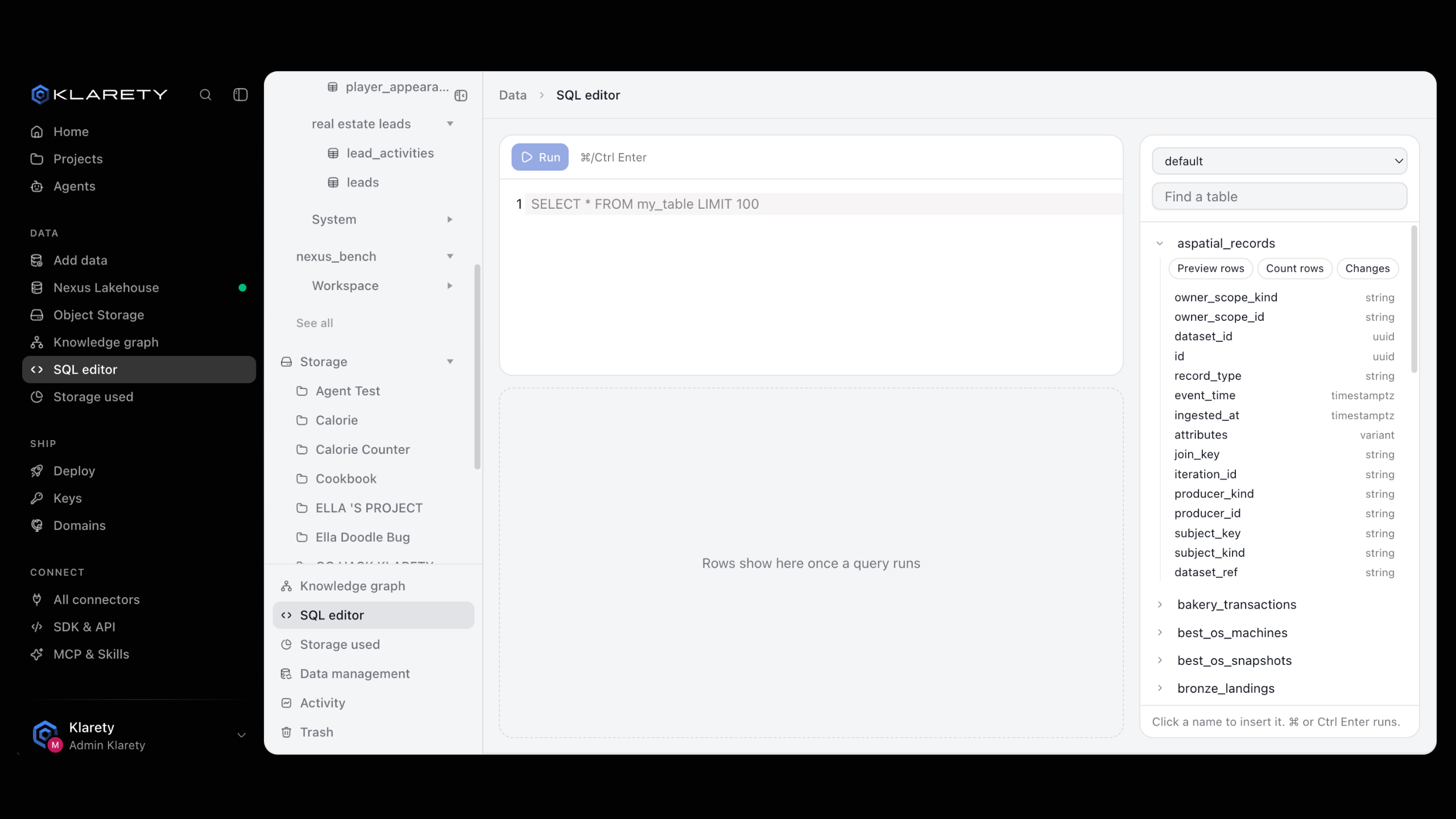
Look at the rows
SELECT * FROM orders LIMIT 100Select Run or press Cmd Enter (Ctrl Enter on Windows). The rows appear below with the row count.
Count them
SELECT COUNT(*) AS orders FROM ordersAnswer a question
Which customers spent the most last month?
SELECT customer, SUM(amount) AS total
FROM orders
WHERE created_at >= DATE '2026-10-01' AND created_at < DATE '2026-11-01'
GROUP BY customer
ORDER BY total DESC
LIMIT 10
Read the cost before you run
Above the results, the editor shows how much data the query reads, and warns before running one your plan does not allow. Narrow it with a WHERE clause on a date or key.
Connect
from klarety import Nexus

nx = Nexus.connect()  # reads KLARETY_API_KEY
Run a query
result = nx.sql("SELECT * FROM orders LIMIT 100")
print(len(result), "rows, read", result.bytes_scanned, "bytes")
for row in result.rows[:5]:
    print(row)
Pass values safely
Use :name placeholders and params. Each value is filled in as a string literal, never as SQL, so cast it where a number or date is meant:
top = nx.sql(
    """
    SELECT customer, SUM(amount) AS total
    FROM orders
    WHERE created_at >= CAST(:start AS DATE) AND created_at < CAST(:end AS DATE)
    GROUP BY customer
    ORDER BY total DESC
    LIMIT 10
    """,
    params={"start": "2026-10-01", "end": "2026-11-01"},
)
print(top.rows)
Estimate before running
estimate tells you what a statement would read and whether your plan allows it, without running it.
print(nx.estimate("SELECT * FROM orders"))Read a large result
max_rows is 1 to 10,000, and at most your plan's page of rows comes back at once. When more rows exist, truncated is true and result_rows reads every row:
result = nx.sql("SELECT * FROM orders", max_rows=10000)
if result.truncated:
    for row in nx.result_rows(result):
        ...
Check that it worked
- The count matches the number of rows you expect in the table.
- The grouped query returns at most ten rows, largest total first.
- From code,
result.rowsis a list of dictionaries keyed by column name.
If something goes wrong
Next steps
- SQL editor: everything the editor does.
- SQL from code: parameters, paging and errors in depth.
- Send a daily report: have an agent run a query like this every morning.