

Plans and billing
Compare plans, start Pro and manage billing.
Your plan sets what is included each month. Open SettingsBilling to compare plans, start Pro and manage billing.
Owners and admins only
Only owners and admins can change the plan or open Manage billing. Everyone else can see the plans.
The plans
| Plan | What it is |
|---|---|
| Free Trial | to try everything for a set number of days, building and running in . |
| Pro | Monthly credits, more included capacity, and deploying apps. Raise monthly credits any time. |
Deploying needs Pro
apps comes with Pro. See Deploy an app.
Compare plans
Compare plans shows plans side by side in Studios, Data, Deploy, Team and AI. Search features finds one line. Each line shows Included, Not included, an amount, a rate in credits, Add-on or Request access.
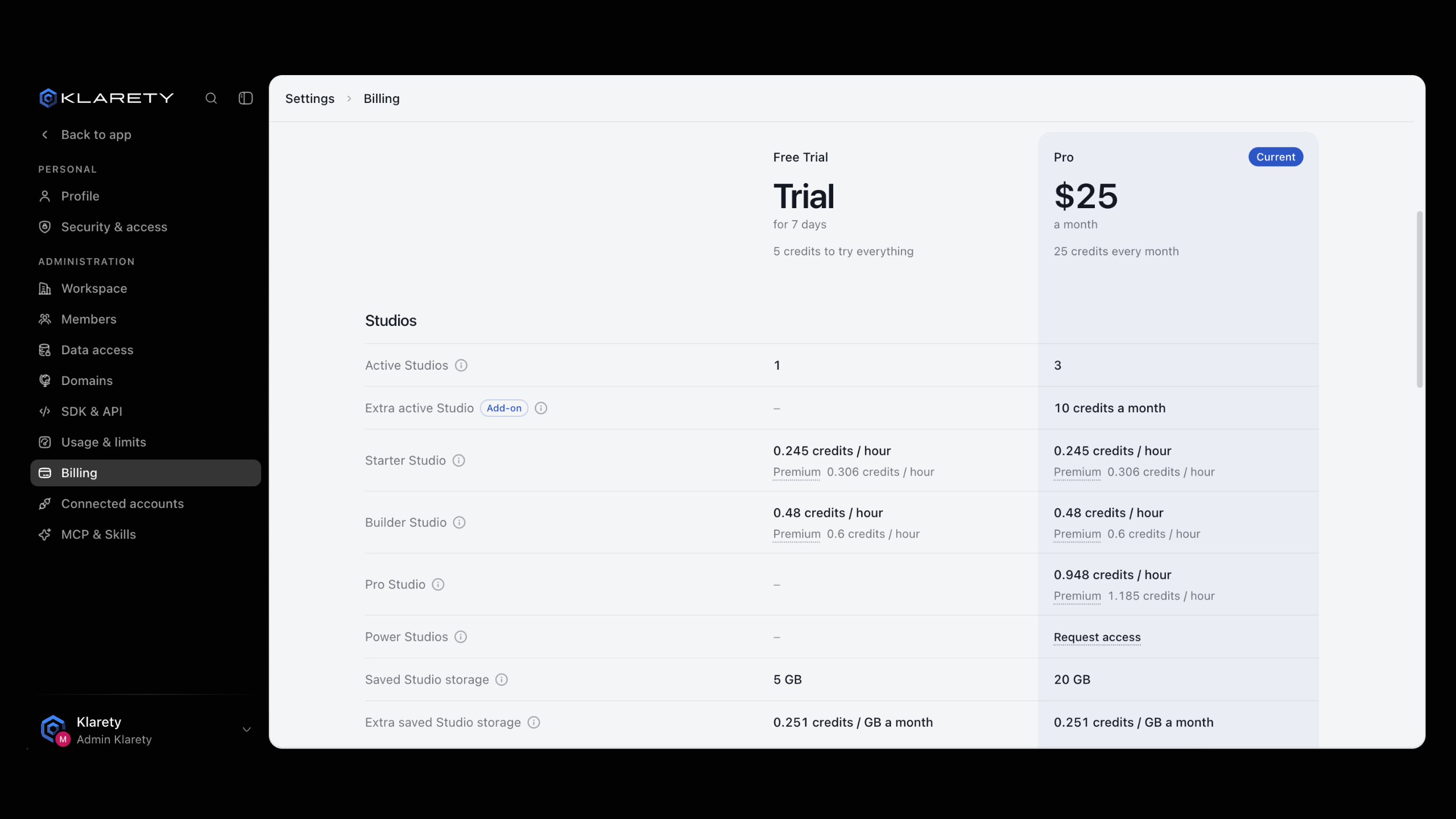
Your plan is marked Current. Your usage against it is in SettingsUsage & limits.
Start your free trial
Choose the trial
On SettingsBilling, select the free trial button under Pro (it names the number of days).
Add a card
Enter your payment details. The notice shows the amount and the date your card is charged unless you cancel first.
Check it worked
The plan shows the trial and its end date. "Payment received. Your plan will appear shortly." may show for a few seconds.
Start Pro
- From no plan: select Start Pro and complete payment.
- During a card trial: select Start Pro now. The trial ends today, your card is charged, and Pro starts immediately.
Start Pro now charges today
Confirm with Pay and start Pro only when you are ready. If it fails, check your payment method in Manage billing and try again.
Manage billing
Manage billing opens the billing portal, where you update your payment method and see invoices.
Plan status
| Status | Meaning |
|---|---|
| trial until a date | You are on the Free Trial. |
| renews on a date | Pro is active. |
| payment past due | A payment failed. Update your payment method in Manage billing. |
| ended | The plan was cancelled. |
Troubleshooting
- "Unable to open billing. Try again." Wait a moment and try again.
- "Plans could not load." Refresh the page.
- A feature shows Request access. It is not on your plan. Select it to tell us what you need; we reply by email.